Inner-Workings of a Software Mind
Sunday, February 20, 2011
The Art of the Start
For those of you who are looking to create new products, sites, and building a new company I suggest you see this video first.
¶ 1:49 AM 0 Comments

¶ 1:49 AM 0 Comments
Sunday, December 06, 2009
How a Browser Works
Here is a good post that I found on the Internet that describes the specifics of how a browser actually works. I remember getting asked this by a Google interviewer 3 years ago. I never was really curious or learned in school these things and usually took the technical aspects of a browser for granted.
http://cnx.org/content/m12851/latest/ ¶ 5:47 PM 3 Comments
http://cnx.org/content/m12851/latest/ ¶ 5:47 PM 3 Comments
Wednesday, September 30, 2009
XSLT Transformation Example: Replacing Node Values in XML
Here's a useful tip that I just recently discovered.
If you want to transform the following XML document to hold different values for elements such as name and phoneNumber,
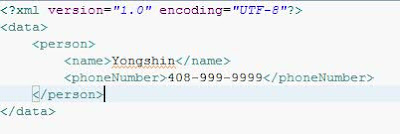
to an XML document such as the following:

Use the following XSLT variation of the identity transform:

Hope you found this useful. Thanks! Sorry for being MIA, if you need me to update the CDT/Eclipse posting please reply back here.
If you want to transform the following XML document to hold different values for elements such as name and phoneNumber,

to an XML document such as the following:

Use the following XSLT variation of the identity transform:

Tuesday, September 11, 2007
Money brings happiness?
Although this picture seems to suggest that money won't make you any happier than you are, it is probably skewed towards people who are already living comfortable lives. I think that in dire circumstances money does come into play. Also in some cases, because of the level of anxiety and stress that follows a terrible situation, money will bring a temporary avenue of relief.
 ¶ 8:00 PM 0 Comments
 ¶ 8:00 PM 0 Comments
Saturday, May 05, 2007
The Greatest Software Ever Written
Read this fascinating article on Information Week about BSD UNIX and its history: What's the Greatest Software Ever Written. I skipped to the end because I didn't feel like reading three pages of fluff to find out the real answer.
¶ 1:14 PM 0 Comments
Tuesday, March 28, 2006
US CS Bachelor’s Degree Production Drops in 2004/2005
Although the statistics might seem quite alarming, I believe that the drop in interest and degrees awarded would be instrumental in promoting the underpaid salaries of software engineers in America.
Link: http://www.cra.org/CRN/articles/march06/vegso.html ¶ 12:25 AM 0 Comments
Link: http://www.cra.org/CRN/articles/march06/vegso.html ¶ 12:25 AM 0 Comments
Saturday, November 12, 2005
HOW TO: Use CDT and MinGW for Eclipse (i.e. develop C/C++ applications in windows)
I've made these instructions due to the difficulty of finding any documentation that was sufficient enough to help me setup Eclipse using MinGW on Windows. I would recommend using MinGW because of the higher success rate and better compability issues for C/C++. If there are any errors or questions please leave comments.
Step 1:
Download MinGW from mingw.org the following:
Extract the files to the following directory c:\mingw\ and install mingw32-make-3.80.0-3.exe to c:\mingw\.
Step 3:
Add c:\mingw\ to the Paths in System Variables of Environment Paths. Make sure you can run gcc -v in the command prompt.
Step 4:
Install CDT for Eclipse using Help-> Software Updates -> Find and Install -> Search for new Features to Install. Add a new remote site with name "CDT" and URL "http://download.eclipse.org/tools/cdt/releases/eclipse3.1". Accept the license agreements to install both CDT packages.
Step 5:
Create a new Managed Make C Project named "Hello World". I prefer managed make because I like the IDE to worry about the details of a make file.
Step 6:
Create a file called main.c with the following contents:
#include "iostream"
#include "string"
using namespace std;
int main()
{
string yourName;
cout << "Enter your name: ";
cin >> yourName;
cout << "Hello " + yourName << endl;
return 0;
}
Step 6:
You should see an error in the console view. Go to the properties menu for the "Hello World" project and Select C/C++ Build. In the Tool Settings tab, for GCC C compiler and GCC C Linker, set the command to "C:\mingw\bin\mingw32-g++.exe ". In the Build Settings tab, uncheck "use default command" for the build command, and replace the command with "C:\mingw\bin\mingw32-make.exe -k". Also change the Artifact name to "HelloWorld". Press OK.
Step 7:
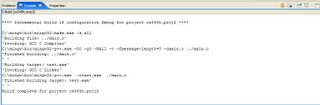
You should now see a screen like the following in the console (click to enlarge):
Step 8:
There should also be a binaries folder that contains "HelloWorld.exe." Run the program by clicking on Run -> Run... Then click on C/C++ Local Applications and click new. Browse for the "Hello World" project and click on "Search project..." to find "HelloWorld.exe". Click Run.
Step 9:
You should a screen like the following in the console, after you finished running the application:
 ¶ 9:05 PM 348 Comments
Step 1:
Download MinGW from mingw.org the following:
- gcc-core-3.4.2-20040916-1.tar.gz
- gcc-g++-3.4.2-20040916-1.tar.gz
- binutils-2.16.91-20050827-1.tar.gz
- mingw-runtime-3.9.tar.gz
- mingw-utils-0.3.tar.gz
- w32api-3.5.tar.gz
- mingw32-make-3.80.0-3.exe
Extract the files to the following directory c:\mingw\ and install mingw32-make-3.80.0-3.exe to c:\mingw\.
Step 3:
Add c:\mingw\ to the Paths in System Variables of Environment Paths. Make sure you can run gcc -v in the command prompt.
Step 4:
Install CDT for Eclipse using Help-> Software Updates -> Find and Install -> Search for new Features to Install. Add a new remote site with name "CDT" and URL "http://download.eclipse.org/tools/cdt/releases/eclipse3.1". Accept the license agreements to install both CDT packages.
Step 5:
Create a new Managed Make C Project named "Hello World". I prefer managed make because I like the IDE to worry about the details of a make file.
Step 6:
Create a file called main.c with the following contents:
#include "iostream"
#include "string"
using namespace std;
int main()
{
string yourName;
cout << "Enter your name: ";
cin >> yourName;
cout << "Hello " + yourName << endl;
return 0;
}
Step 6:
You should see an error in the console view. Go to the properties menu for the "Hello World" project and Select C/C++ Build. In the Tool Settings tab, for GCC C compiler and GCC C Linker, set the command to "C:\mingw\bin\mingw32-g++.exe ". In the Build Settings tab, uncheck "use default command" for the build command, and replace the command with "C:\mingw\bin\mingw32-make.exe -k". Also change the Artifact name to "HelloWorld". Press OK.
Step 7:
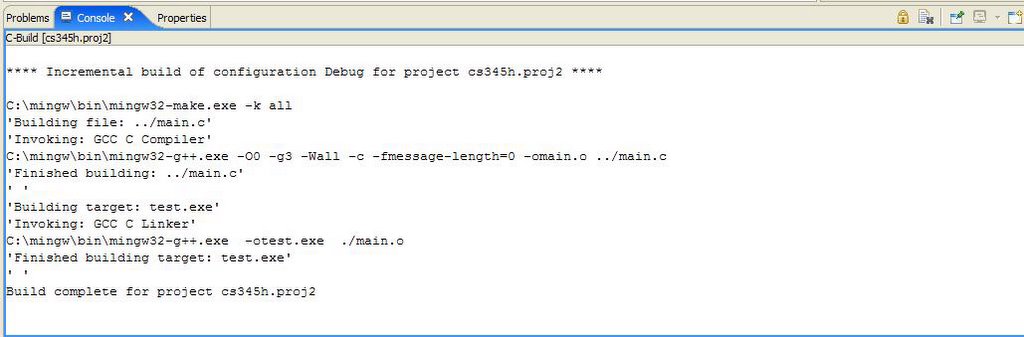
You should now see a screen like the following in the console (click to enlarge):
Step 8:
There should also be a binaries folder that contains "HelloWorld.exe." Run the program by clicking on Run -> Run... Then click on C/C++ Local Applications and click new. Browse for the "Hello World" project and click on "Search project..." to find "HelloWorld.exe". Click Run.
Step 9:
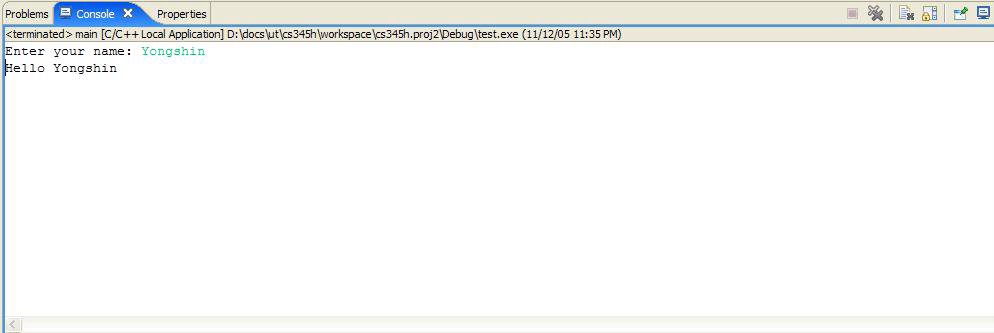
You should a screen like the following in the console, after you finished running the application:
 ¶ 9:05 PM 348 Comments
Saturday, November 05, 2005
Google now pays to help spread Firefox!
It seems that now Google has given the Firefox community a boost of support by paying publishers $1.00 for every Firefox download with Google Toolbar from their website. As Firefox 1.5RC1 is now available for download, the race to gain serious market share in the browser market has now been reborn. At 11% marketshare (read ZDNet news), Firefox is determined to show signs of continued progress. Support Firefox! For more information on how to do add the Adsense Functionality to your site and support Firefox go to the AdSense FAQ or click on one of the buttons under the "Google Stuff" sidebar, on the bottom right, to try out Firefox or Adsense!

Credit: spreadfirefox.com ¶ 8:41 AM 1 Comments
Credit: spreadfirefox.com ¶ 8:41 AM 1 Comments
Friday, October 21, 2005
OpenOffice 2.0 is out!
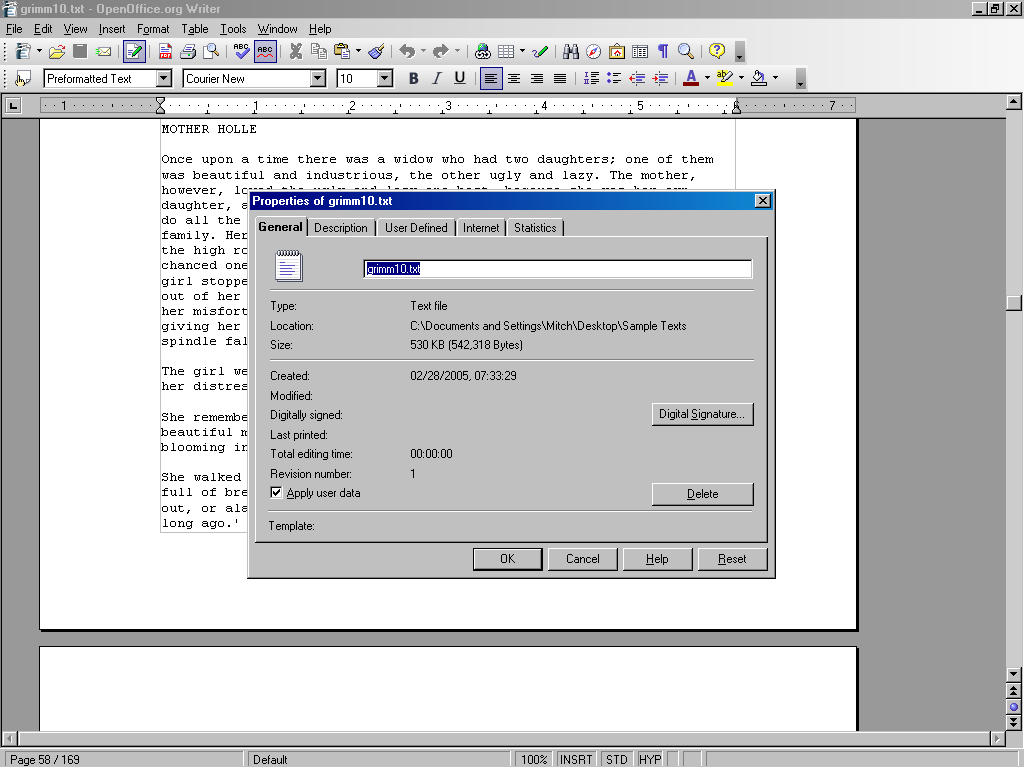
Although its been long due, OpenOffice is now poised to be one of the premier office suites with the release of version 2.0. I've made my mind to completely switch to OpenOffice about 6 months ago when betas were rolling out. Surprisingly, I found it very easy to use and intiutive just like Microsoft Office. There are so many new features in OpenOffice that shouldn't be overlooked. One of my favorites happens to be Microsoft Office compatibility. I usually view all my PowerPoint, Excel, and Word documents from Google using OpenOffice. The greatest thing that I believe OpenOffice will have to offer is cross-platform compatibility, in particular Linux compatability. Until now Linux has lacked a legitimate office suite that would allow users to do what could be done with an office suite like Microsoft Office. Sooner or later I wish to transition over to Kubuntu, although I know the maturity of Linux applications is still not comparable to current Microsoft Windows applications. However, Linux still seems to be growing substantially, one giant step at a time. Here are more screenshots of of OpenOffice!

Credit: openoffice.org ¶ 9:34 AM 3 Comments
Credit: openoffice.org ¶ 9:34 AM 3 Comments
Monday, September 26, 2005
Dine for America
I saw this link on a friend's blog and it seems to be on October 5th, restaurants all across the country are giving up proceeds during the dinefest to the Hurricane Katrina /(Rita?) fund. Click on the link below for restaurants in Austin, TX or go directly to www.dineforamerica.org for details. It seems like a great way to raise money for a special cause. As for the hurricane posts, you can see that there was a anticlimax as Rita didn't even touch Austin and caused Louisiana some more damage. How much more can Louisiana take? It seems like the agony there is unbearable. Please have them in your thoughts and prayers.
Credit: dineforamerica.org ¶ 3:02 PM 2 Comments
Credit: dineforamerica.org ¶ 3:02 PM 2 Comments
